Feature Revamp: Knowledge Centre
Improving end-to-end experience for admin to organise content and staff to browse resources
Role
Sole Product Designer
Duration
October - December 2025
Team
Product Manager, Engineering Team, Customer Success
Tools
Figma, Figma Make, ChatGPT
CASE STUDY AT A GLANCE
Context
The Knowledge Centre, a centralised repository designed to give frontline retail teams immediate access to company policies and other materials. It was rapidly launched in early 2025 to meet urgent market demand.
Problem
The rapid rollout left critical gaps in features and user experience. As adoption grew, limitations in information architecture and discoverability became apparent. It raised concerns about enterprise customer retention.
Solution
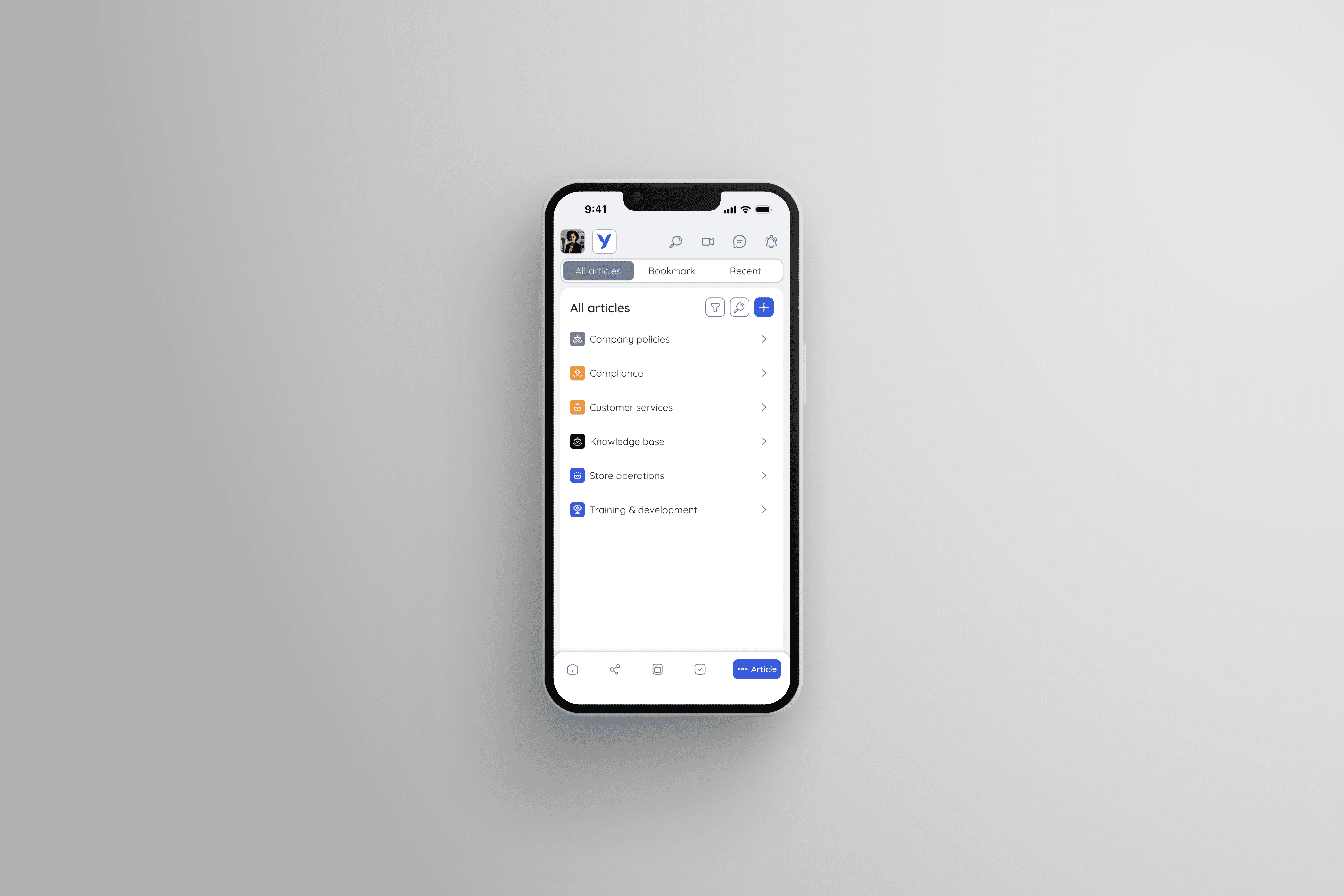
I led the end-to-end redesign of the Knowledge Centre, focusing primarily on restructuring its information architecture and refining several user flows.
Impact
The redesign contributed to a 17% increase in overall Knowledge Centre adoption and a 20% growth in admin engagement. The new structure successfully enhanced content discoverability for thousands of frontline users.
DEEP DIVE INTO THE CHALLENGE AND WHY IT MATTERED
The legacy tool worked in theory, but broke down in real frontline situations.
Launched rapidly in early 2025 to meet urgent market demand, the Knowledge Centre gives frontline teams essential access to company policies and guides. However, this rapid rollout left critical UX gaps. As adoption grew, particularly among customers migrating from Meta Workplace, these limitations became glaring, raising serious concerns about customer retention.
WHAT I OWNED AND THE VALUE I DELIVERED
As the sole designer, I owned the end-to-end redesign of the Knowledge Centre, contributing to a 17% increase in adoptions.
To achieve this, I completely restructured the platform's information architecture and streamlined the navigation, empowering frontline teams to discover relevant content instantly.
Overall value delivered:

17% increase in Knowledge Centre adoptions

20% growth in admin engagement

Enhanced content discoverability
UNCOVERING USERS' PAIN POINTS
I worked closely with the Product Manager and Customer Success to conduct a discovery phase. Our goal was to understand the negative feedback from users, especially the Meta Workplace migrants.
By performing a heuristic audit and analysing user feedback, I identified three primary friction points:
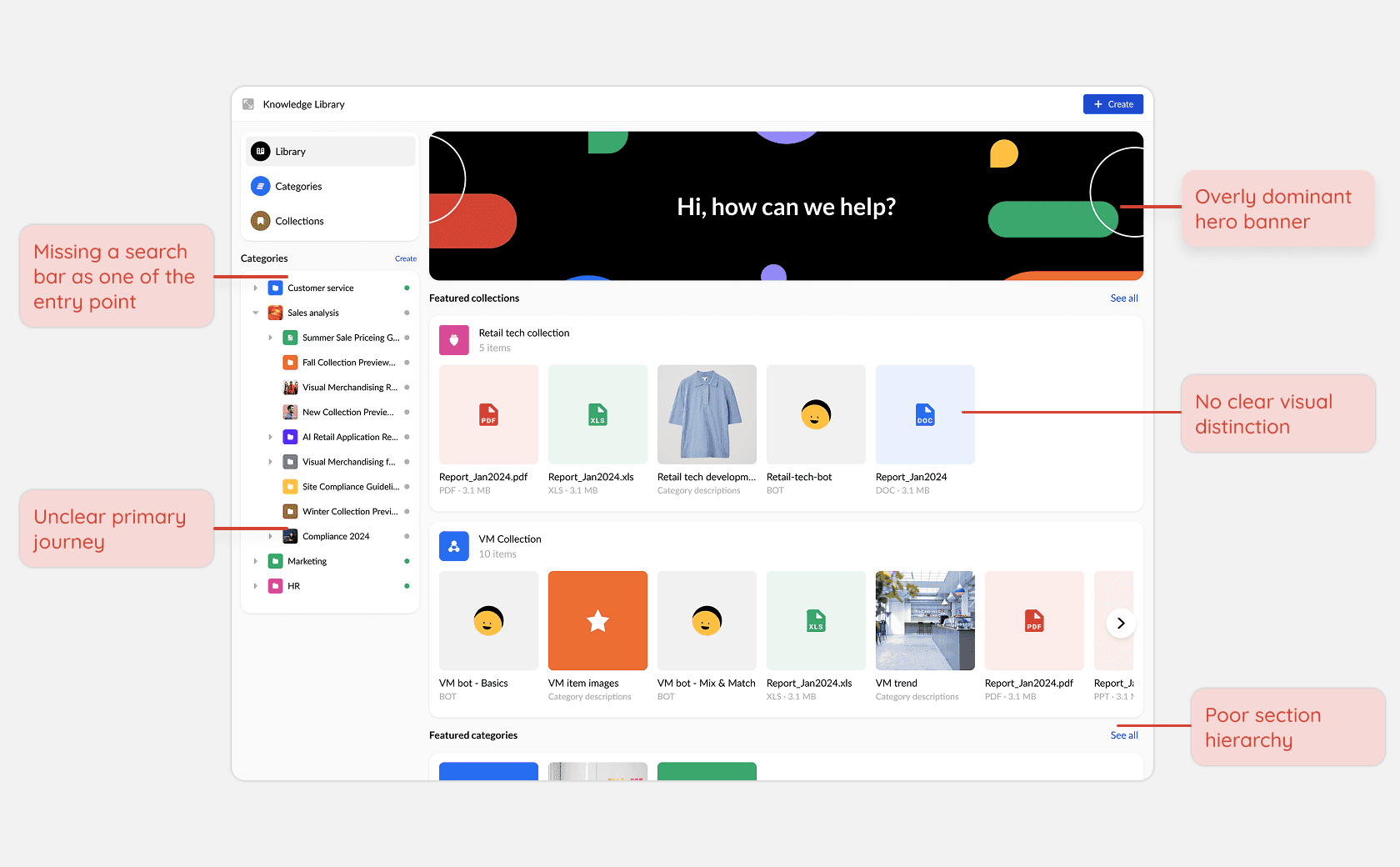
Confusing information architecture and poor layout
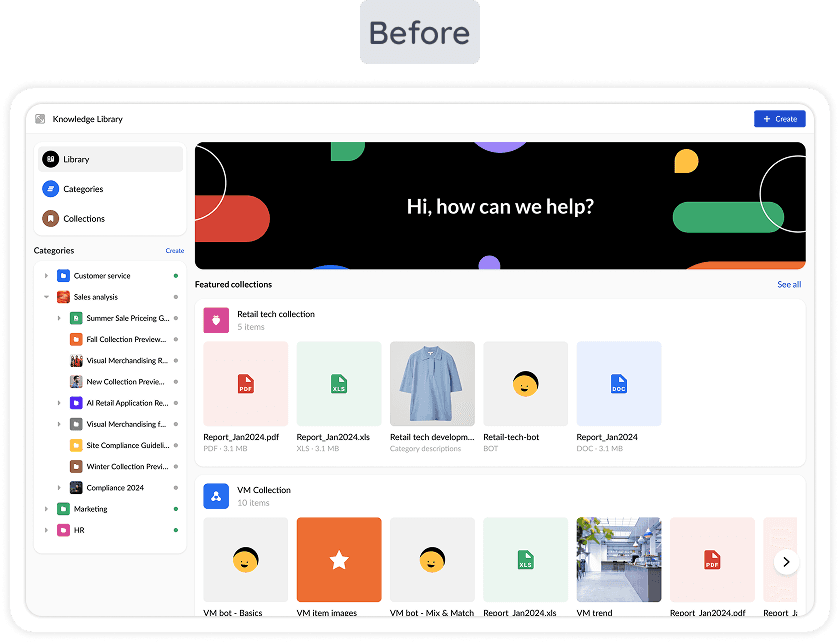
The legacy homepage suffered from significant cognitive overload due to its redundant navigation structure. It lacked clear hierarchy, forcing users into a "long scroll" to find basic content. It also had poor information density with large images and oversized cards.
Inefficient creation flow
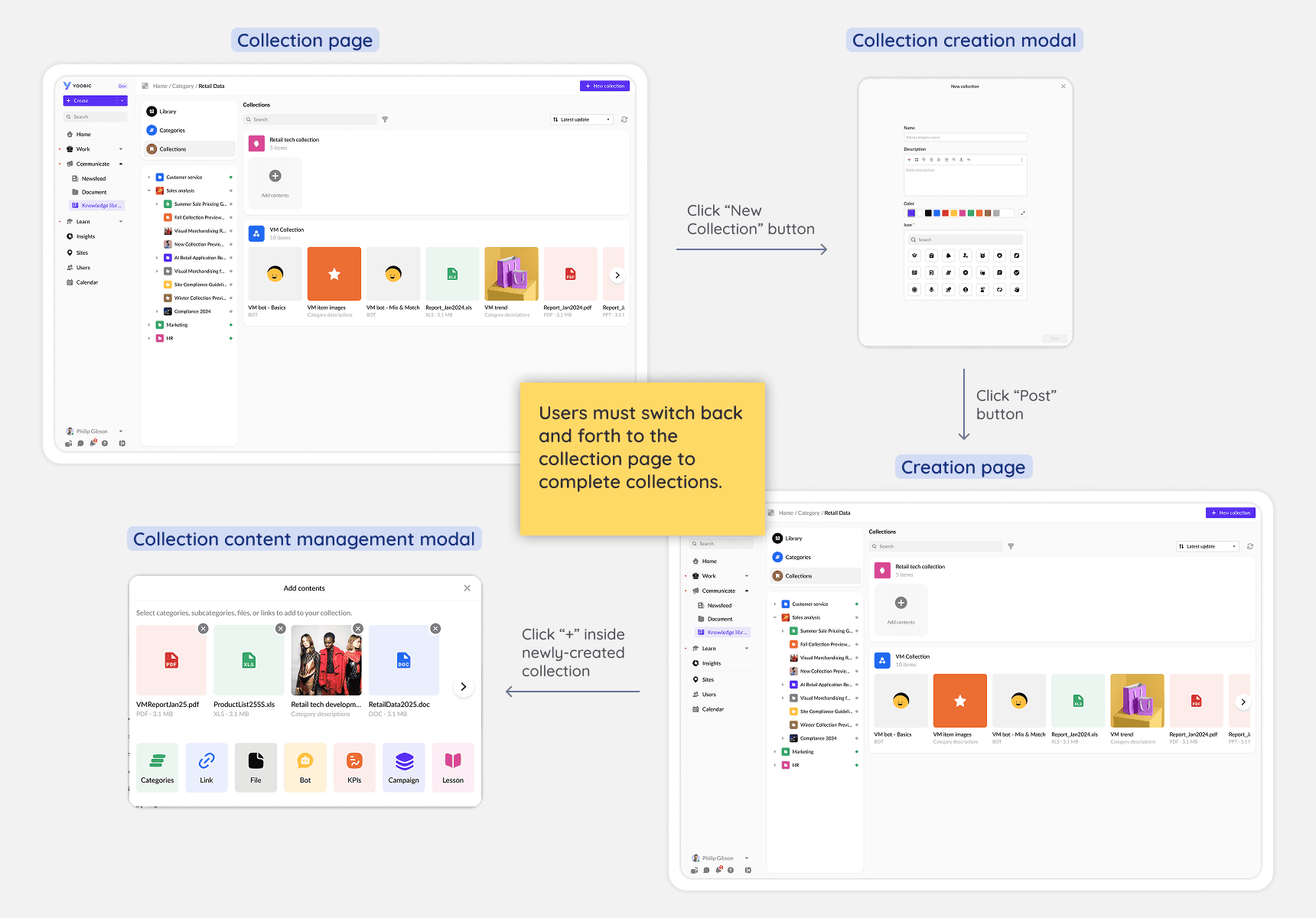
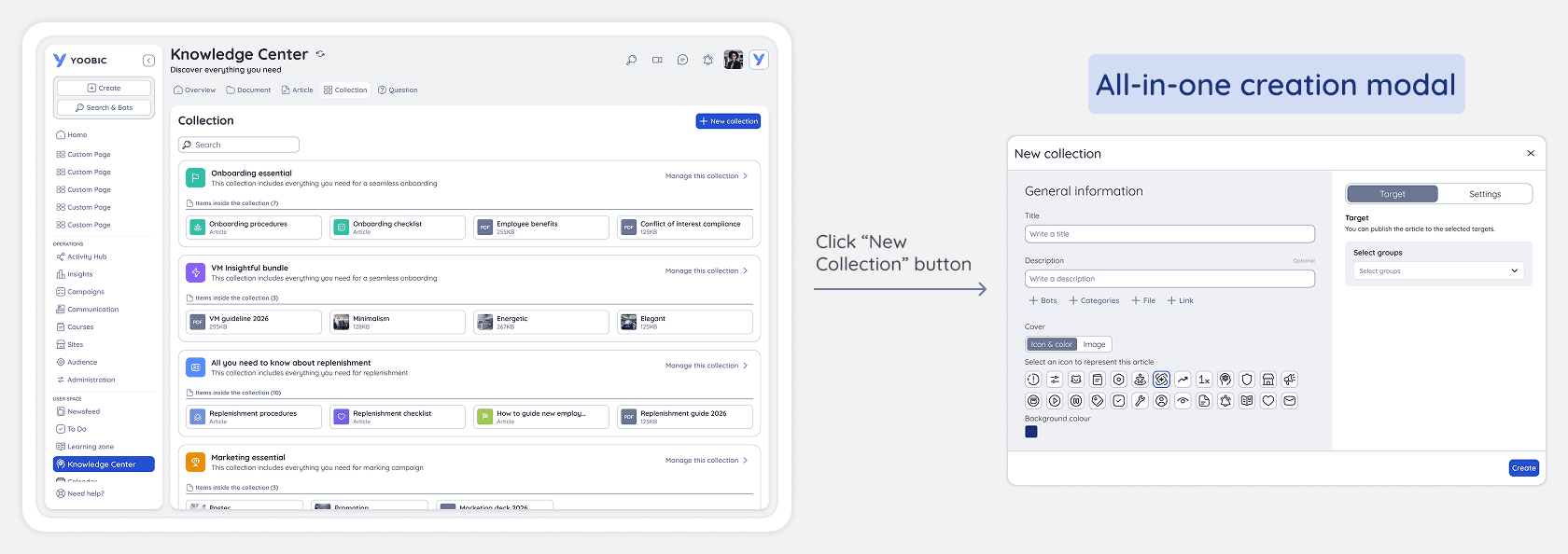
Creating a collection is one of the most frequent tasks, but the legacy workflow was highly disjointed. Users were forced to open one modal to create the collection, return to the collection page to locate it, and then open a second modal just to add content. This constant back-and-forth created unnecessary friction.
Visual inconsistency
Due to the rapid rollout, the Knowledge Centre lacked visual consistency and several "standard" features. The interface felt disconnected from the broader YOOBIC ecosystem. These inconsistencies hindered adoption and made the product feel unfinished.
CONDUCTING COMPETITIVE ANALYSIS
By benchmarking our tool against Meta Workplace, we identified a significant feature gap that frustrated our users.
I discovered that many of these gaps existed because the original version was a "speed-to-market" release. This meant core administrative features were skipped to save time.
Notifications
Admins were not notified of any comments made in the Knowledge Centre
Comments management
Admins were not able to edit or remove comments made by users
Bookmark
Users could not bookmark any articles and collections
DEFINING FEATURE REVAMP STRATEGY
We identified three key insights that served as the foundation for our product strategy and helped shape the design solution
Driven by the results of analysing the negative feedback and benchmarking against Meta Workplace, we identified the following principles as the foundation for our feature revamp strategy:
Optimised discoverability
Reduce cognitive load through better structure

Streamlined workflow
Consolidating admin steps into a single and cohesive flow

Functional reliability
Integrating core tools like notifications and bookmarks to meet user expectations
CRAFTING THE DESIGN SOLUTION
I reduced cognitive load by restructuring the fragmented platform into a highly discoverable layout.
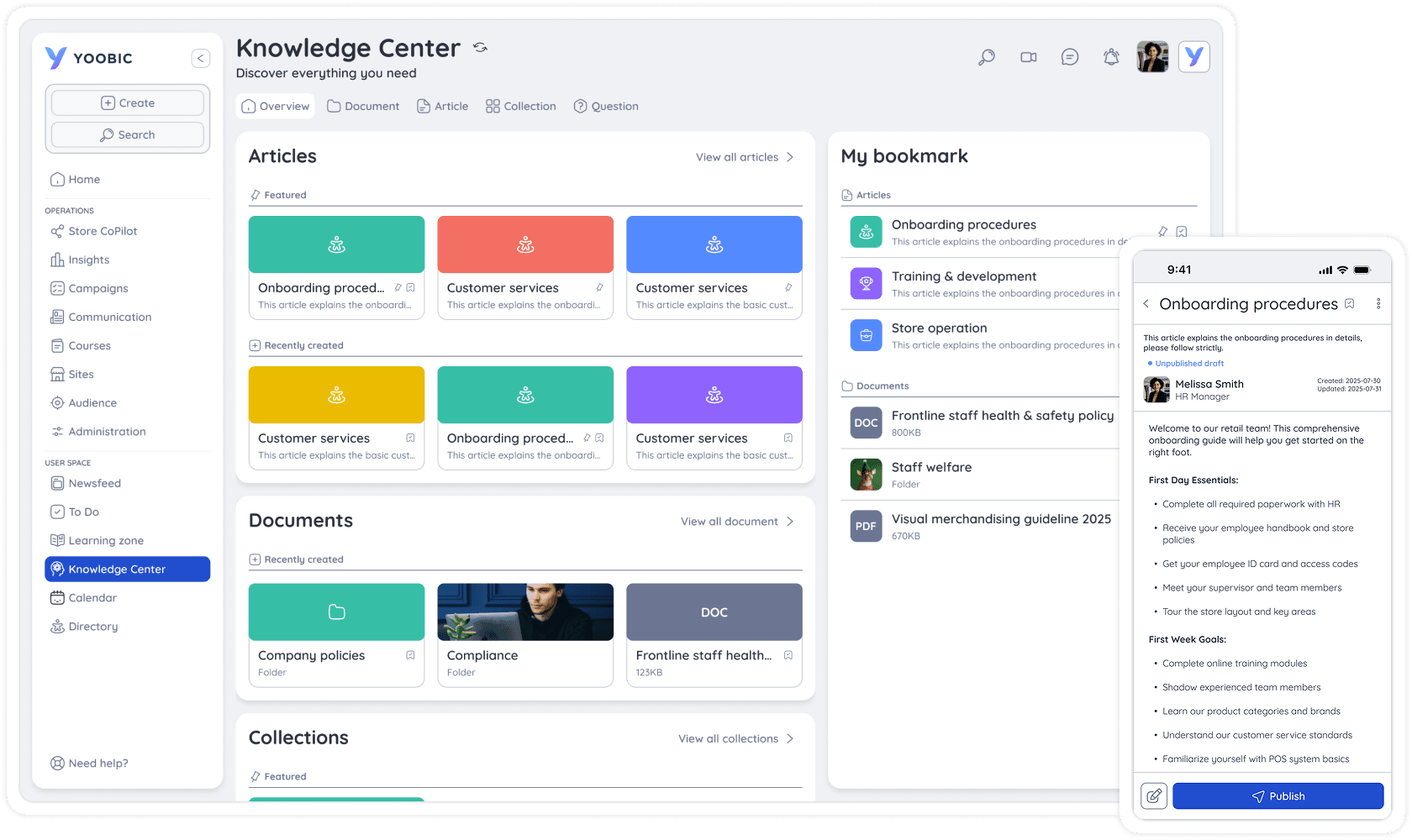
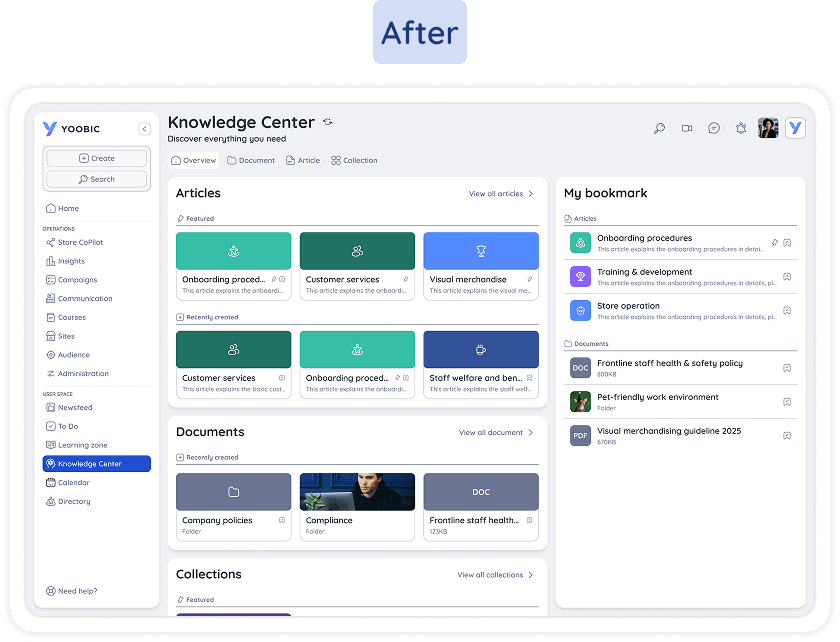
I designed a new widget-style landing page that logically groups articles, documents, and collections into distinct sections. By removing the decorative image banner, I maximised screen real estate and eliminated visual clutter. I also introduced a "My Bookmarks" feature for instant access to saved resources. To support this discovery led experience, I simplified the sitemap so users can identify core resources at a glance.
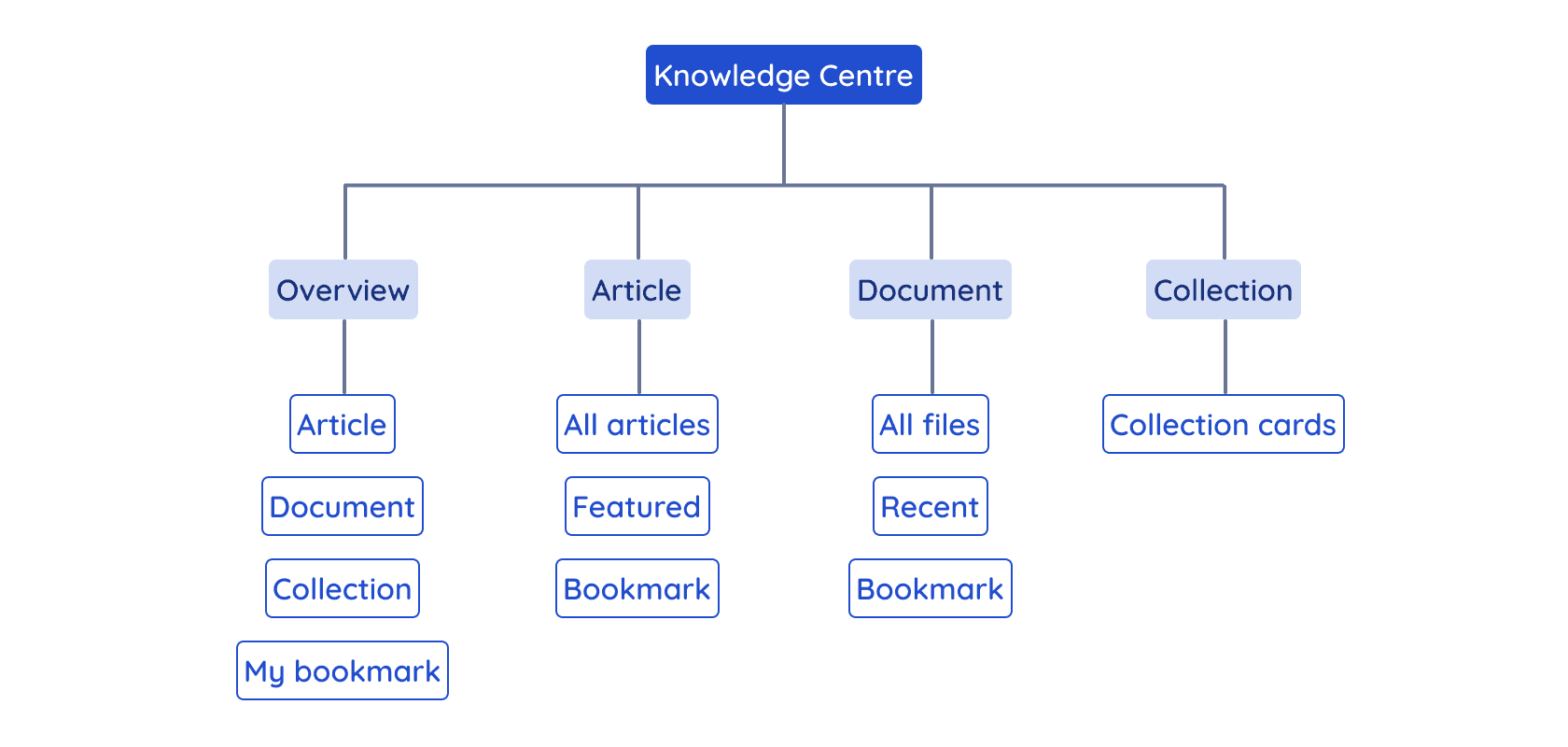
The following comparison highlights the transition from a cluttered legacy layout to a streamlined widget-style interface:
I eliminated operational friction by transforming disjointed tasks into a unified creation workflow.
Creating collections is a high-frequency task, yet the legacy process forced HQ admins to jump between multiple screens. I eliminated this friction by introducing an all-in-one creation modal that centralises the workflow and drastically reduces the clicks required to create a collection.
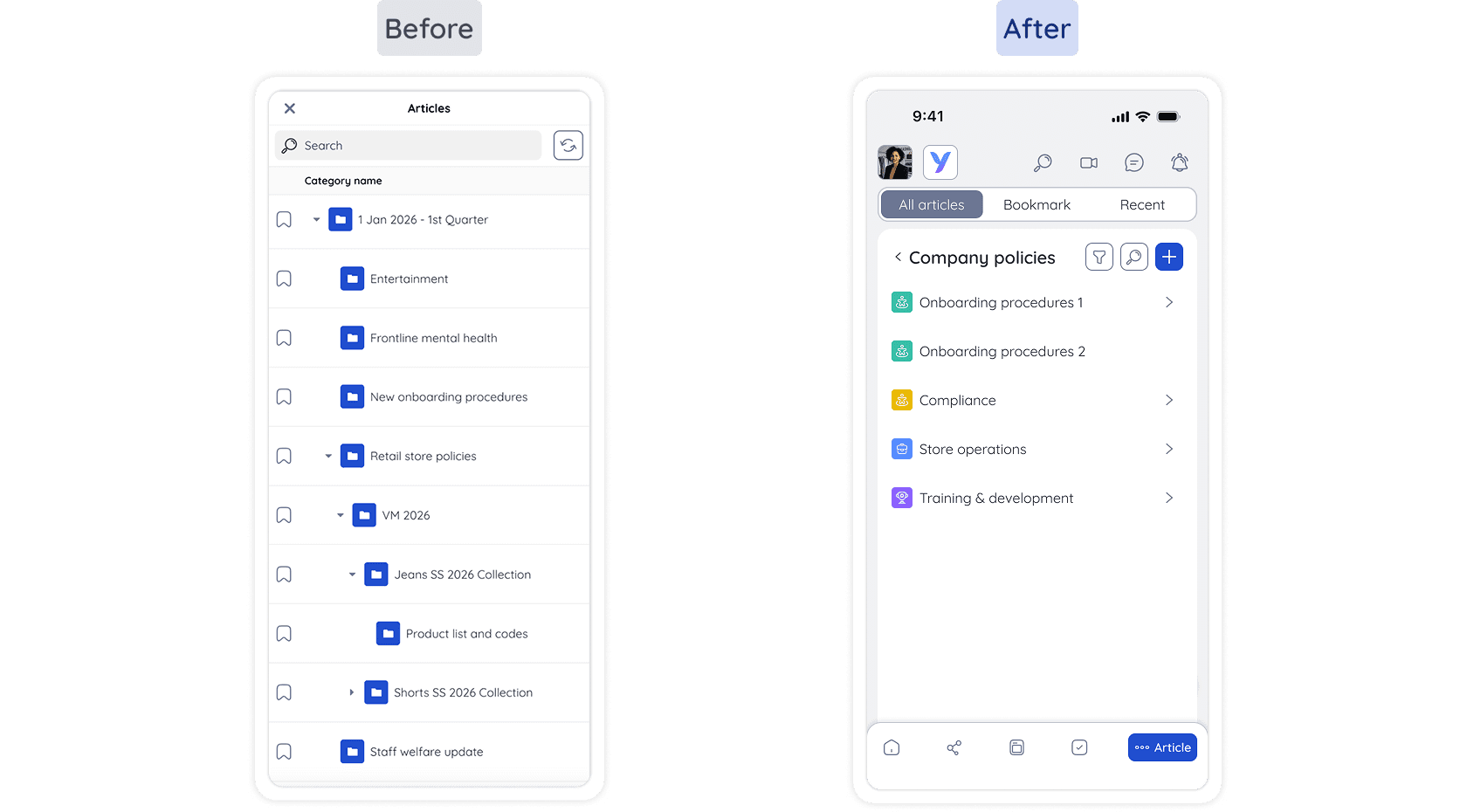
I ensured reliable access for mobile users by replacing complex folder hierarchy with a flat and list-based navigation
For frontline workers in high-pressure environments, instant mobile access is critical. To support them, I replaced the complex folder hierarchy view with a flat and list-based navigation. This eliminated unnecessary visual clutter and awkward scrolling, making essential policies instantly accessible from mobile.
VALIDATING THE DESIGN SOLUTION
Due to resource constraints, I conducted an internal walkthrough with Customer Success team to validate the design solution.
In accordance with company policy, external testing was reserved for the highest-priority projects in the release cycle. Since this project wasn't considered the highest-priority, I couldn't test directly with end-users. I adapted by using the Customer Success team as a proxy, leveraging their deep understanding of customer pain points. A high-fidelity prototype was used to ensure that complex interactions and workflows could be tested accurately.
Test objectives
1
Discoverability - Evaluate if users can easily understand the new navigation and locate a target article
2
Task completion - Verify that admins can create and publish collections without friction
3
Efficiency - Determine if the unified workflow accelerates high-frequency administrative tasks
Key findings
1
Achieved a 100% success rate for users navigating to target articles and collections
2
Reduced the average time to access bookmarked content by 40 seconds
3
Reduced the collection creation time from 7 minutes down to 5 minutes
4
Identified a usability flaw where editing a previously published article felt counter-intuitive
ITERATING THE DESIGN SOLUTION
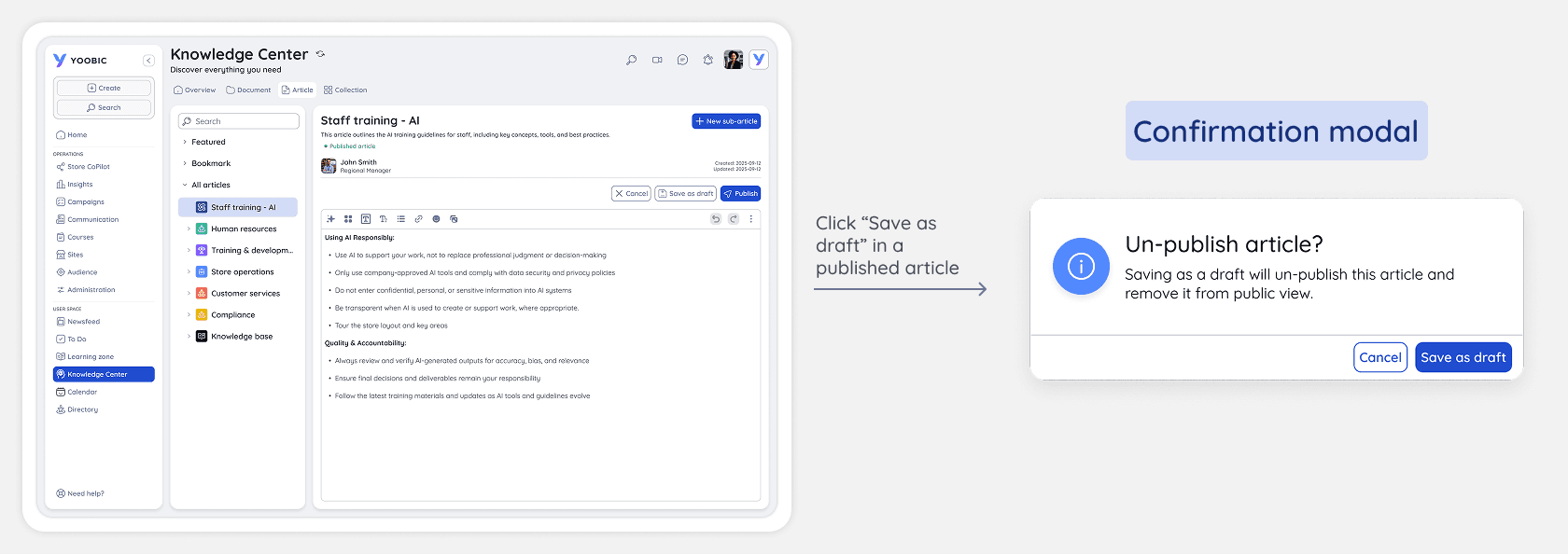
I made subtle changes to solve the issue of versioning mismatch when editing a published article.
Participants found it counter-intuitive that saving a draft didn’t update the published article and they didn't realise the changes were not updated since the state of the article remained "published". To eliminate this versioning mismatch, I redesigned the workflow so that any 'Save as Draft' action on a published article triggers an unpublished state. A confirmation modal now requires admins to acknowledge the un-publishing action before saving their changes as a draft. This prevents users from seeing outdated content and ensures a predictable publishing cycle.
OUTCOME AND BUSINESS IMPACT
By partnering with Product and Engineering for a seamless launch, we delivered a streamlined experience that increased Knowledge Centre adoption by 17%.
Focusing heavily on structural information architecture rather than just visual updates allowed us to launch a highly functional product efficiently. Once deployed, the new widget-based layout and flattened navigation delivered immediate and measurable value to our users:
17% increase in Knowledge Centre adoption
By resolving core usability barriers, we transformed an underutilised resource into an essential daily tool. Enterprise customers seamlessly integrated the new Knowledge Centre into their regular operations.
20% growth in admin engagement
By refining the various workflows, we reduced the time required for several administrative tasks (e.g. creating collections 28% faster). Removing operational friction encouraged HQ admins to engage with the Knowledge Centre more frequently.
Enhanced discoverability
The new widget-based layout and flattened mobile navigation successfully eliminated visual clutter. Users achieved a 100% success rate in locating target documents, and the new "My Bookmarks" feature reduced the average time to access saved content by 40 seconds.
REFLECTION AND TAKEAWAY
This project was a great lesson in how to build a reliable product while working within real-world business constraints.
Navigating limited developer capacity and restricted user access forced me to make strategic trade-offs, ultimately teaching me how to adapt my process to deliver a highly functional product.
Prioritise structural foundation over visual perfection
Working with limited developer bandwidth meant I couldn't fix every minor UI inconsistency. Instead, I focused entirely on getting the Information Architecture right, reinforcing that a solid and intuitive structure provides far more value to users than a flawless interface.
Leverage internal expertise when user access is restricted
Because formal external testing was reserved for higher-priority releases, I couldn't validate the redesign with actual customers. Rather than skipping validation entirely, I learned to leverage the Customer Success team for internal expert reviews, turning them into my most valuable resource for pressure-testing the UX before launch.
Other projects at Yoobic
Discover how I tackle complex enterprise challenges and scale design solutions across different product areas
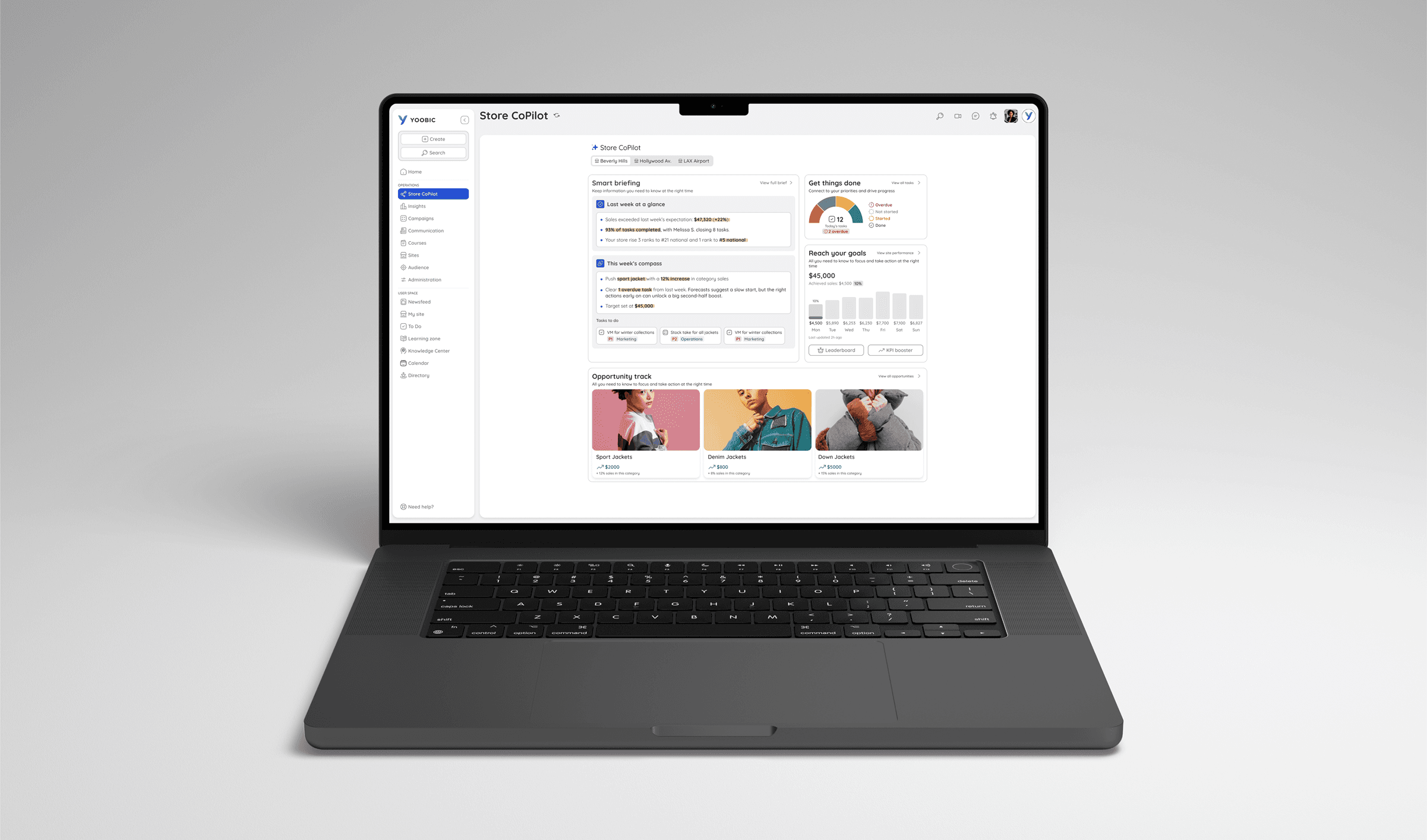
Feature Launch: AI Store CoPilot
A 0-to-1 AI product that saves store manager 4+ hours a week by turning overwhelming data into digestible insights and trackable action plans

Design System: Scaling through Simplification
Streamlining our design language by auditing and reducing redundant components by 40%